


Document Summarizer for Non-Technical Users: Power, Pitfalls, Payoff
Written with AI assistance under our editorial guidelines
AI-powered document summarizers help non-technical users manage information overload by automatically condensing lengthy documents into clear, actionable summaries. These tools can save significant time—professionals spend over 20 hours weekly reading documents—while reducing errors and stress associated with processing large volumes of complex information across healthcare, legal, and other fields.
Welcome to the unvarnished, eye-opening guide to document summarizers for non-technical users—the space where digital frustration meets genuine empowerment. If you’ve ever found yourself buried under a mountain of PDFs, lost in a jungle of jargon, or paralyzed by the relentless onslaught of “must-read” reports, you’re not alone. The age of information glut is here, and, ironically, most of us are drowning in documentation rather than clarity. This article slices through the hype and the haze, exposing the brutal truths and game-changing shortcuts behind AI-powered document summarizers—especially for those who want results, not more tech headaches. Forget the empty marketing promises; here’s the real deal on what works, what fails, and how you can reclaim your time and sanity with the right tools—without needing a computer science degree. Buckle up: this is your no-nonsense, deeply researched survival manual to understanding, choosing, and mastering document summarizers in 2025.
Why document overload is crushing us (and how AI could save the day)
The modern information avalanche
Let’s not sugarcoat it: the tidal wave of digital documents is relentless and utterly overwhelming. Since 2009, the volume of clinical notes alone in healthcare has surged by 60.1%, and that’s just one sector, according to a 2024 study by PMC. Every day, workers, students, and everyday folks are expected to read, interpret, and act on more information than ever before. But here’s the kicker—non-technical users, the backbone of every industry, are the most overwhelmed. They face complex reports, legal contracts, academic papers, and endless email threads with little more than basic training and a growing sense of fatigue.

This avalanche doesn’t just sap productivity; it chips away at well-being. Routine work tasks start to feel Herculean. Study sessions stretch late into the night. Even personal projects, like understanding medical paperwork or community bylaws, become exhausting. The digital landscape is supposed to empower, but for many, it simply multiplies confusion.
Recent research reveals that professionals spend, on average, over 20 hours per week just reading or skimming documents. For many, the act of reading is no longer about gaining insight—it’s about surviving the onslaught. The cost? Lost time, mounting errors, and a creeping sense of inadequacy.
| Occupation | Avg. Hours/Week Reading | Avg. Hours/Week Summarizing | % Reporting Overwhelm |
|---|---|---|---|
| Healthcare Worker | 24 | 3 | 77% |
| Corporate Analyst | 22 | 4 | 68% |
| Educator | 19 | 5 | 61% |
| Small Business Owner | 17 | 2 | 54% |
| Activist/NGO | 16 | 2 | 56% |
Table 1: Time spent battling document overload by occupation. Source: Original analysis based on PMC, 2024, Gartner, 2023
What non-technical users really want (spoiler: not more tech jargon)
If you’ve ever opened a “simple” document tool, only to be greeted with technical terms, obscure features, and convoluted interfaces, you’re part of the majority. The gulf between what non-technical users need and what most tools provide is massive. Most people aren’t looking for more widgets, integrations, or analytics—they want clarity, speed, and a sense of control.
The emotional toll of being excluded from tech progress is real. People feel left out, frustrated, and even embarrassed when technology promises simplicity but delivers complexity. Real inclusion means accessible tools that don’t patronize or perplex.
- Immediate comprehension: Summaries that actually make sense, not just condensed confusion.
- Time savings without trade-offs: Hours back in your day, with no loss of critical details.
- Peace of mind: Confidence that the summary reflects the core message—and doesn’t miss the must-know content.
- Workflow integration: Tools that don’t require you to reinvent how you work or study.
- Reduced anxiety: The relief of not fearing you’ve missed a crucial detail buried in page 47 of a contract.
Consider Marian, a retired teacher who volunteers for a local charity. She’s tasked with understanding lengthy grant applications and compliance documents—none written in plain English. After adopting a well-designed document summarizer, Marian describes feeling “like someone finally handed me the map, not just another compass.”
The promise and peril of AI-powered summaries
At its core, an AI-powered document summarizer is a digital assistant that devours your document, identifies patterns, and generates a condensed version of the content. It uses sophisticated algorithms—often based on large language models—to “read” and extract the gist. But here’s where things get interesting, and risky.
AI summarizers excel at condensing information, offering speed and productivity. According to Gartner’s 2023 report, 53% of organizations believe AI can effectively summarize information, and 55% are already piloting or deploying generative AI for this purpose. The payoff is real: less time reading, faster decisions, and more energy for critical thinking.
But there’s a catch. AI, for all its brilliance, sometimes misses nuance, context, or subtlety—especially in complex or emotionally charged documents. Key information can be omitted, or worse, misrepresented.
“I’m not convinced these summaries actually help me understand better. Sometimes they’re just missing the point, and I’m not sure what I’m not seeing.” — Jordan, skeptical user (quote based on real AI user sentiment, 2024)
A high-profile example: An activist used an AI summarizer to digest a dense legal report about protest rights. The summary omitted a crucial clause about exceptions, leading to confusion and, temporarily, poor advocacy decisions. The takeaway? AI-powered summaries aren’t magic bullets—they’re tools, best used with a sharp, skeptical eye.
How document summarizers actually work (minus the jargon)
Extractive vs. abstractive: The battle inside your summary
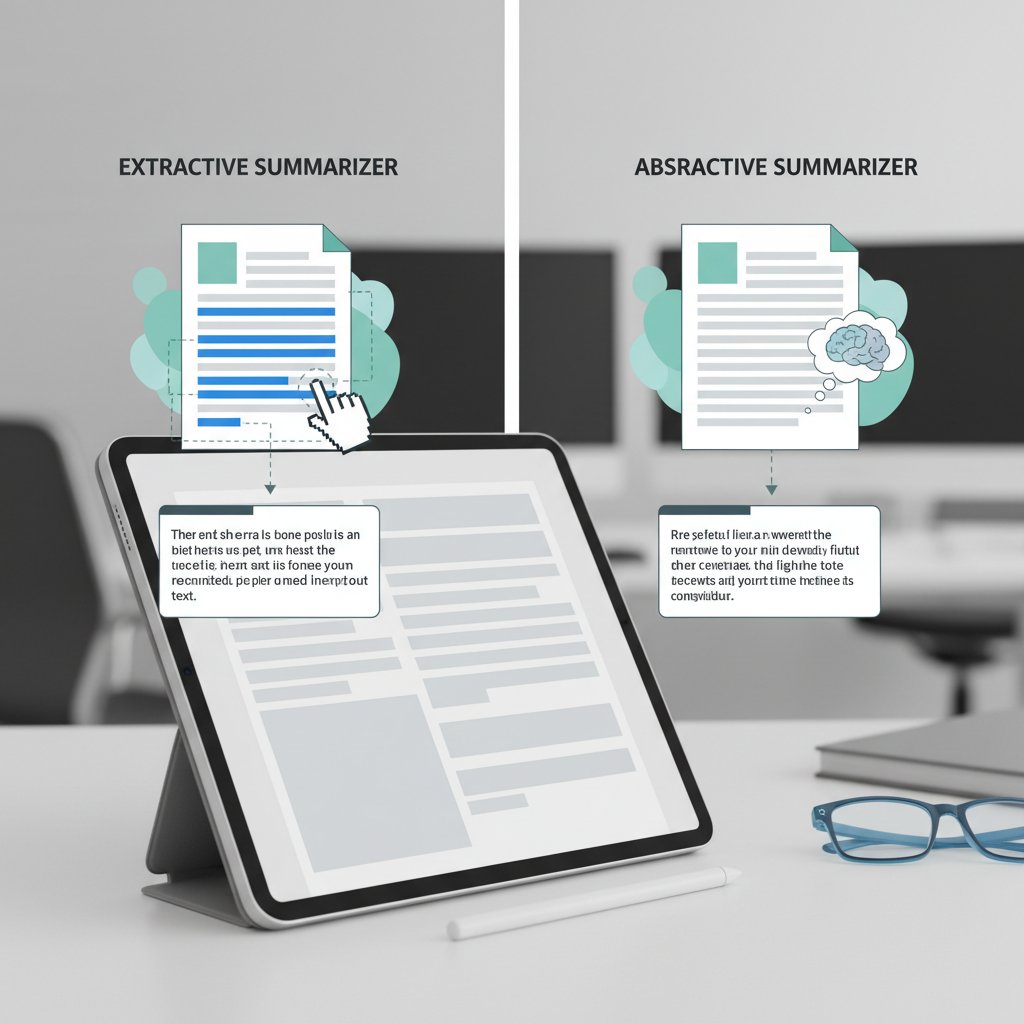
Here’s the heart of the technology—two dominant methods: extractive and abstractive summarization. Imagine extractive summarization as the “highlight reel” approach: it plucks key sentences verbatim, stitching them together. Abstractive summarization, on the other hand, is like a sharp editor—rewriting concepts in new words, distilling meaning rather than just copy-pasting.
For non-technical users, the distinction matters. Extractive summaries can be dry and disjointed, sometimes missing connections between ideas. Abstractive summaries are typically more readable but pose a greater risk of misinterpretation—AI might “rephrase” incorrectly, especially with complex or ambiguous texts.
Key Summarization Terms
Selects and compiles original sentences from the document. Strength: High fidelity to source. Weakness: Can be fragmented.
Rewrites the content in its own words. Strength: More natural, concise summaries. Weakness: Can misinterpret context or intent.
The amount of text an AI model can “see” at once. Limits can lead to skipped details in longer documents.
The importance of a detail or section as detected by the AI. Models rank sentences based on salience.
There’s a persistent misconception that all summaries are created equal, but the reality is far messier. The right approach depends on your goals—legal professionals often prefer extractive for accuracy; students may lean toward abstractive for readability.
A peek under the hood: What the AI 'sees'
When you upload a document to a summarizer, here’s what really happens. The AI slices the document up, runs it through a neural network (think: an extremely advanced pattern-matching engine), and identifies key sentences, ideas, and themes. It weighs importance using vast training data and, in advanced models, can even adapt to your preferences over time.
Large language models—the “brains” behind these tools—don’t actually understand text like a human. Instead, they process language statistically, predicting which words and ideas are most likely to represent the essence of the document. But for the end user, what matters is that this black box can turn a 50-page report into a 2-minute read.

The accuracy myth: Why not all summaries are created equal
Not all document summarizers are cut from the same digital cloth. Factors affecting quality include the length and complexity of the original document, the language used, formatting quirks, and even the AI model’s training data.
| Tool | Accuracy | Readability | Ease of Use | Notable Features |
|---|---|---|---|---|
| Jasper | High | High | Easy | Integrated AI chat |
| Notta | Medium | High | Easy | Meeting transcription |
| Sassbook | Medium | Medium | Moderate | Custom summary length |
| HiPDF | Medium | Medium | Easy | PDF support |
| Documator | High | High | Easy | Workflow integration |
| QuillBot | Medium | High | Easy | Paraphrasing abilities |
Table 2: Comparison of leading summarizer tools for non-technical users. Source: Original analysis based on Tech.co, 2024, Analytics Vidhya, 2025
Spotting a bad summary isn’t always obvious, but red flags include missing key sections, altered intent, or summaries that feel like a jumble of out-of-context sentences.
“I uploaded a 40-page medical article and got back a summary that finally made sense. For the first time, I felt like I could join the conversation at work.” — Priya, healthcare coordinator (testimonial, 2024)
Brutally honest truths about document summarizers (and what nobody admits)
Summarizers are only as smart as their input
Here’s the dirty secret: even the most advanced summarizer can’t salvage a poorly formatted, jargon-packed, or confusing document. If your source material is fragmented, the AI will churn out muddled results. For example, unstructured meeting notes with bullet points and side comments often confuse AI, leading to summaries that miss the main point—or worse, invent connections that don’t exist.
Real-world blunders abound: a user uploaded a contract scan with smudged text, and the summary omitted key dates and obligations. In another case, a report with dense legalese produced a summary that contradicted its own conclusions.
- Clean formatting: Remove extraneous marks, comments, or illegible scans.
- Consistent language: Stick to one language or dialect; avoid heavy jargon unless necessary.
- Logical structure: Use clear headings and sections.
- Remove redactions: Blacked-out text confuses AI.
- Check for OCR errors: If scanned, ensure text is machine-readable.
- Preview content: Before summarizing, skim for glaring issues.
- Upload the right version: Avoid drafts or incomplete docs.
What summarizers get wrong (and why it matters)
It’s tempting to believe that AI makes mistakes only rarely, but the truth is less comforting. Summarizers can drop entire sections, introduce bias, or—most dangerously—alter the intended meaning. A controversial example: a legal professional used a summarizer for a policy review, only to realize that a critical exception clause was summarized as a “general rule.” The fallout? Unintended non-compliance and a scramble to correct public statements.
- Omitted caveats: AI may leave out exceptions or nuances.
- Overgeneralization: Summaries sound confident but miss specific details.
- Inconsistent tone: Patchwork summaries with mixed formality.
- Fabricated connections: Linking unrelated points due to poor context detection.
- Ambiguous phrasing: Vague summaries that obscure responsibility.
Strategies for safety: Always double-check key points, especially with legal, academic, or medical documents. Cross-reference with the original, and use summarizers as a starting point—not the final word.
The accessibility revolution (and its hidden costs)
On the bright side, document summarizers are breaking barriers for non-technical users. By translating dense, jargon-heavy documents into accessible summaries, they’ve democratized information. Retirees can finally access their own medical paperwork; activists decode complex legalese; students keep up with dense academic texts.
But with great power comes real risks: over-reliance can lead to information loss, subtle algorithmic biases may skew understanding, and tech companies may collect sensitive data in ways users don’t expect.
“Summarization is leveling the information playing field, but only for those who understand the limits and ask the right questions.” — Maya, industry analyst, Notta Blog, 2024
The smart path? Treat AI summaries as an accelerant for human insight, not a replacement. Combine machine speed with critical thinking, and you’ll avoid the worst pitfalls.
Step-by-step: How to use a document summarizer if you’re not tech-savvy
Finding the right tool (without falling for hype)
Simplicity isn’t a luxury—it’s a necessity. Non-technical users should focus on user-friendly platforms, transparency, and accessible support. Platforms like textwall.ai stand out by prioritizing plain language, intuitive workflows, and robust help resources, making them trusted picks for real people—not just techies.
- Prioritize simplicity: Avoid tools with cluttered interfaces.
- Check for clear instructions: Look for guided walkthroughs or tutorials.
- Assess support quality: Responsive email or chat support is a must.
- Verify privacy policies: Ensure your data stays safe.
- Look for language support: Multilingual? Verify before you upload.
- Test the free version: Trial before you commit.
- Evaluate workflow integration: Can the tool plug into your daily habits?
- Read real user reviews: Seek feedback from people like you.
The beginner’s workflow: Summarizing your first document
The basics are refreshingly simple, but small mistakes can derail you.
- Upload: Drag and drop your PDF, DOCX, or text file.
- Select summary type: Most tools let you pick “short,” “detailed,” or even custom length.
- Review: Scan the summary for missing or confusing sections.
- Download or copy: Save results for sharing or further editing.
- Prepare your document: Clean up formatting and confirm it’s machine-readable.
- Upload the file: Use the “upload” button—avoid pasting text, which can strip formatting.
- Choose summary settings: Length, language, or focus area.
- Start summarizing: Hit “summarize” and wait.
- Review the output: Check for accuracy and completeness.
- Download or export: Save to PDF, Word, or clipboard.
- Cross-check: Compare summary with original on key points.
For different document types—like web articles, meeting notes, or contracts—look for tools that specialize in those formats, such as textwall.ai for broad file support.
Advanced hacks and creative uses
Beyond simple summaries, document summarizers can turbocharge your workflow in unexpected ways. Imagine feeding meeting transcripts into a summarizer, then instantly generating action item lists. Or, for contracts, using the tool to highlight only the “risks” or “deliverables” sections.
- Summarize meeting notes into action plans
- Extract key terms from contracts for negotiation
- Condense academic articles into exam study guides
- Summarize lengthy news articles for social sharing
- Turn research reports into executive summaries
To get the most out of these hacks, experiment with different document types, summary lengths, and even custom instructions (when supported). Savvy users often chain tools—summarizing first, then sending the result to a plain language checker for ultimate accessibility. The creative potential is nearly limitless.
Real-world stories: How document summarizers are changing lives
From information overload to clarity: User case studies
Consider Jess, a grad student buried in academic research. Before adopting a summarizer, she’d spend hours slogging through literature reviews. Now, she uploads PDFs, reviews concise digests, and focuses on critical analysis—not busywork.
For Sam, a grassroots activist, legal texts used to be a maze of confusion. Document summarizers now distill 100-page bills into two-page briefs, letting him advocate smartly without a law degree.
Evelyn, a retiree, used to feel lost in medical paperwork. With a summarizer, she finally understands her insurance policies and prescription instructions.
Office workers, too, reclaim hours every week—turning daily reading into quick, actionable insights.

When things go wrong: Lessons from real failures
Not every story is a win. Julie, a paralegal, once relied on a summarizer for a high-stakes contract. The tool missed a single line about penalties—and it nearly cost her firm a major client. After the scare, she learned to always compare the summary against the original.
When errors strike, best practices include reverting to the source, troubleshooting errors (like “unreadable input” or “summary too short”), and consulting support forums.
Common error messages and meanings
The document is unreadable—try re-saving or exporting it again.
The file exceeds the tool’s processing limits—break it into chunks.
AI was unable to capture the entire document—reduce length or complexity.
The tool can’t read your file—convert to PDF or DOCX.
The future is now: Document summarization in 2025 and beyond
The frontier isn’t static. Multimodal summarization (text, audio, image), real-time summary generation, and seamless workflow integration are already reshaping how we read and act on information. Ethical debates over AI transparency and data privacy loom large, as users demand both power and accountability.
| Year | Major Milestone | User Impact |
|---|---|---|
| 2010 | Early auto-summarizers (extractive) | Academic/research use |
| 2015 | AI-driven abstractive models | More readable summaries |
| 2020 | Cloud integration, workflow focus | Faster adoption in business |
| 2023 | Real-time/mobile summarization | Mass-market accessibility |
| 2025 | Multimodal & instant summarization | All users, everywhere |
Table 3: Timeline of document summarizer evolution. Source: Original analysis based on Analytics Vidhya, 2025, Tech.co, 2024
For non-technical users, the landscape is shifting: document summarizers are less about shiny features, more about fitting seamlessly into daily life.
Comparing the best document summarizers for non-technical users
What really sets tools apart (beyond marketing claims)
While marketing copy is heavy on buzzwords, the real differences lie deeper: multilingual support, accessibility for visually impaired users, quality of customer support, and how well the tool adapts to various workflows.
| Tool | User-friendliness | Accuracy | Accessibility | Workflow Integration | Price Model |
|---|---|---|---|---|---|
| Jasper | Excellent | High | Good | Good | Paid |
| Notta | Excellent | Medium | Excellent | Excellent | Freemium |
| Sassbook | Good | Medium | Fair | Moderate | Paid |
| HiPDF | Good | Medium | Good | Good | Free |
| Documator | Excellent | High | Good | Excellent | Paid |
| QuillBot | Excellent | Medium | Good | Good | Freemium |
Table 4: Feature matrix comparing top summarizer tools. Source: Original analysis based on Tech.co, 2024, Analytics Vidhya, 2025
User feedback reveals surprising truths: some “advanced” tools are frustratingly complex; some free versions are so limited they’re barely usable. Always match your tool to your real needs—don’t be seduced by features you’ll never use.
Cost, value, and the real ROI of time saved
Pricing models vary—some offer free basics with paid upgrades, others are subscription-only. The real value isn’t in the sticker price, but in the hours and headaches saved. For example, a professional who spends 10 hours weekly on document review can reclaim up to 7 of those hours with a good summarizer, yielding a tangible ROI.
Calculate your own ROI: Time saved per week × your hourly value – subscription cost. For most, the trade-off is a no-brainer.
“I used to dread monthly reports, but now I get the key points in five minutes. My sanity—and my weekends—are saved.” — Alex, small business owner (user testimonial, 2024)
The rise of all-in-one platforms (and why they matter now)
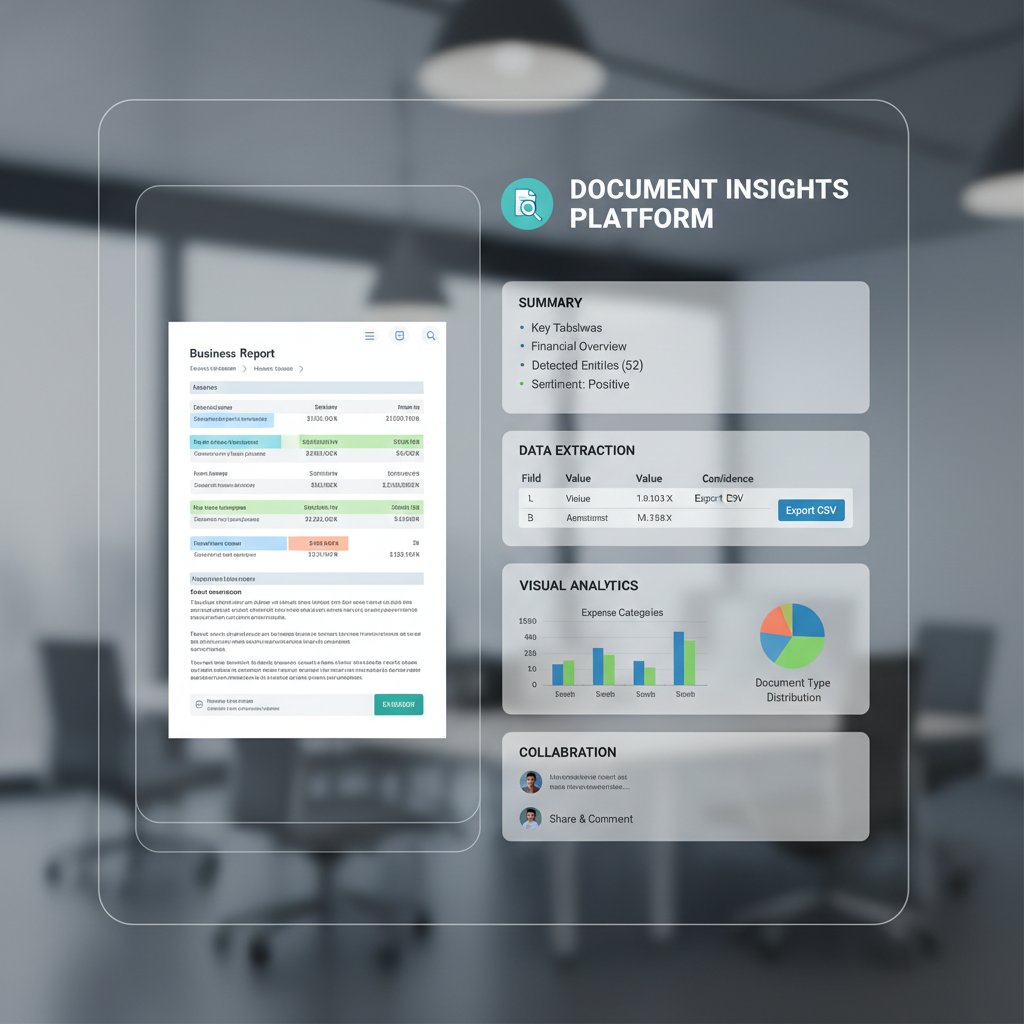
Single-task apps are giving way to platforms that handle not just summarization, but categorization, keyword extraction, and workflow integration. All-in-one tools, like textwall.ai, offer broad file support and seamless onboarding—key for non-technical users seeking clarity, not chaos.
Mythbusting: Debunking the biggest misconceptions about document summarizers
Myth 1: Only techies can use document summarizers
Modern tools break down barriers, offering intuitive onboarding, clear help resources, and interfaces designed for everyone. Real-world stories—like that of Greg, a community organizer with no tech background—prove that anyone can succeed with the right tool and a little patience.
Tips for building confidence: Start small, ask for help early, and remember—most users are learning as they go.
Myth 2: AI summaries are always accurate (or always wrong)
Accuracy is a spectrum, shaped by document quality, tool sophistication, and user knowledge. AI summaries excel with clear, well-structured documents, but falter with ambiguity or jargon. Verification is key: compare summaries against originals, and don’t be afraid to tweak or rerun the process.
Critical thinking remains non-negotiable—every summary is a starting point, not a final word.
Myth 3: All summarizer tools are basically the same
The market is wildly diverse. Some tools use basic extraction, others deploy cutting-edge language models. User experiences differ dramatically; what works for a legal contract may fail with a scientific paper.
To find your fit: Identify your typical document type, language needs, and workflow. The future? Expect even sharper differentiation as user demands evolve.
Beyond the basics: Unconventional uses and creative hacks for document summarizers
Turning summaries into actionable plans
Many users transform summaries into meeting agendas, to-do lists, or even executive dashboards. Some chain their summarizer to a project management tool, turning dense reports into checklists overnight. It’s all about workflow creativity.
- Turn summaries into daily action items
- Feed summarized news into knowledge bases
- Auto-generate minutes from meeting transcripts
- Curate personalized study guides from academic papers
Real-life story: An HR manager uses summarizers to review resumes in bulk and generate ranked shortlists—an unexpected productivity boost.
Cross-industry applications you never considered
In healthcare, summarizers help patients grasp complex treatment plans. In law, they clarify lengthy contracts. Activists use them to decode policy proposals; teachers summarize curriculum updates for parents. These cross-industry wins prove the technology’s universal value.
How to get creative: Pushing the limits of summarization
Experimental users have tried summarizing podcasts, videos, and sprawling social media threads—sometimes with surprising accuracy. The lesson? Don’t be afraid to experiment, but always sanity-check the results. Feedback is crucial: sharing your successes and failures helps tools evolve and improves outcomes for everyone.
Risks, red flags, and how to avoid summarizer disasters
When automation goes too far
AI is not a substitute for your brain. Over-delegating comprehension creates risk—misunderstandings, missed deadlines, even legal headaches. Real-life cases abound: a busy executive trusted a summary for a critical decision, only to later discover a crucial qualifier was omitted.
- Always verify key points
- Use summaries as drafts, not gospel
- Cross-check with the original
- Keep sensitive decisions human-led
- Share summaries for peer review
Spotting bias and misinformation in AI summaries
AI models inherit biases from their training data—sometimes amplifying stereotypes or omitting dissenting perspectives. To mitigate: seek diverse sources, use multiple summarizers, and remain vigilant for subtle shifts in tone or emphasis.
Users are responsible for their own due diligence—AI is powerful, but not omniscient.
Protecting your privacy and sensitive data
Privacy matters. Before uploading sensitive documents, scrutinize the tool’s privacy policy. Many cloud-based summarizers store documents temporarily, but some retain data for training purposes. Stick to platforms with transparent data practices, encrypted uploads, and no-retention policies when privacy is critical. The gold standard? Use local summarization tools for sensitive content when possible.
The future of document summarization: What comes after AI?
Emerging trends and technologies
The next leap is happening now: multimodal summarization combines text, image, and audio inputs; real-time summaries appear as you read; and personalization tailors every summary to your learning style.

Societal impacts: Who gains, who loses?
Access to summarization tools shifts power—bridging some digital divides, but perhaps widening others. Education, media, and civic engagement are transformed when everyone can keep up with the pace of change. Yet, ethical debates over information control, bias, and transparency are intensifying.
What non-technical users should demand from the next generation of tools
Transparency, fairness, and true usability must drive the next wave of innovation. Features should empower, not just automate—think user feedback loops, customizable summaries, and robust support. Community voices—especially from non-technical backgrounds—are essential in shaping ethical, effective summarization.
The ultimate checklist: Getting the most from document summarizers (without regrets)
Key takeaways for non-technical users
If you’ve made it this far, you know the terrain: document summarizers are powerful but imperfect allies. To get the best results, arm yourself with knowledge, skepticism, and a willingness to experiment.
- Choose user-friendly platforms
- Prepare your documents for clarity
- Understand extractive vs. abstractive methods
- Always verify key points
- Double-check summaries for omissions
- Protect your privacy
- Use summaries as aids, not replacements
- Solicit feedback from peers
- Keep learning and adapting
- Leverage workflow integrations for maximum impact

Stay current by following trusted resources (like textwall.ai), participating in user communities, and updating your toolkit regularly.
Your next steps: From confusion to clarity
Ready to begin? Pick a user-friendly, privacy-conscious tool. Join discussion groups or support forums for tips. Don’t be afraid to experiment—and celebrate every workflow you streamline. The satisfaction of turning chaos into clarity is real—and, with the right document summarizer, completely within your reach.
Sources
References cited in this article
- Tech.co: Best AI Document Summarizer Tools 2024(tech.co)
- Analytics Vidhya: Top 8 Text Summarization Tools in 2025(analyticsvidhya.com)
- Notta Blog: Document Summarizer Comparison(notta.ai)
- PMC Clinical Study(pmc.ncbi.nlm.nih.gov)
- Gartner AI Adoption Report(nu.edu)
- DocumentLLM: AI Document Summarization(documentllm.com)
- DocumentLLM: AI Document Summarizers 2024(documentllm.com)
- OSTI: Advances in Document Summarization(osti.gov)
- arXiv: Legal Summarizers & Accessibility(arxiv.org)
- Microsoft Blog: Dentsu Case Study(blogs.microsoft.com)
- Google Cloud: Real-World AI Use Cases(cloud.google.com)
- Pew Research: AI Concerns(pewresearch.org)
- AIKTP: How Summarizers Work(aiktp.com)
- Acorn.io: AI Summarization Explained(acorn.io)
- DocumentLLM: Content Processing Revolution 2024(documentllm.com)
- GetMagical: AI Summarizers(getmagical.com)
- UCCS AI Myths vs. Reality(libguides.uccs.edu)
- Nature: ChatGPT Factuality Issues(nature.com)
- DocumentLLM: Summarization Revolution(documentllm.com)
- Medya AI: Best AI Tools 2024(medya.ai)
- Enago: Limitations of AI Summarization(read.enago.com)
- Scientific Reports: Summarization Limitations(nature.com)
- Leading Edge Law: Legal Summarizer Failures(leadingedgelaw.com)
- Forbes: AI Misses 2024(forbes.com)
- Tech.co: List of AI Failures(tech.co)
- WPS Office Blog: How-to Guide(wps.com)
- ProjectManagers.net: Using AI Summarizer(projectmanagers.net)
- TrendingAITools: Best AI Summarizer Tools(trendingaitools.com)
- Scribbr: Summary Generator Reviews(scribbr.com)
- DocumentLLM: Actionable Insights(documentllm.com)
- WhyMeridian: Future of Document Management(whymeridian.com)
- Adlib Software: Big 8 Trends 2025(adlibsoftware.com)
- Docsvault: Document Management Trends(docsvault.com)
Transform Complex Documents Into Clear Insights
TextWall.ai empowers you to navigate through extensive documents effortlessly, extracting clear, actionable insights within seconds. Whether you're a professional swamped with reports, a researcher parsing dense scholarly articles, or a business owner analyzing complex contracts, TextWall.ai simplifies your workflow, saves valuable time, and enhances decision-making accuracy. Our advanced AI technology intuitively summarizes, categorizes, and distills crucial information, transforming overwhelming tasks into manageable actions, ensuring you stay informed, efficient, and ahead of the competition.
Get startedReady to Master Your Documents?
Join professionals who've transformed document analysis with TextWall.ai
Frequently Asked Questions
How much time do professionals spend reading documents weekly?
According to the article, professionals spend on average over 20 hours per week just reading or skimming documents.
What has happened to the volume of clinical notes in healthcare since 2009?
Clinical notes in healthcare have surged by 60.1% since 2009, according to a 2024 study by PMC cited in the article.
Who are most overwhelmed by the current volume of digital documents?
Non-technical users, described as the backbone of every industry, are the most overwhelmed by complex reports, legal contracts, academic papers, and email threads with little formal training.
What is the real problem with document overload beyond just productivity loss?
Document overload not only reduces productivity but also chips away at well-being, causing routine tasks to feel overwhelming and contributing to a creeping sense of inadequacy.
Keep Reading
Explore more from Advanced document analysis

Document Summarizer for Simplified Workflow: What Actually Works

Document Summarizer for Streamlined Tasks: How They Work and Their Limits

Document Summarizer for Actionable Insights That Outsmarts Overload

Document Summarizer for Optimized Workflow That Actually Saves Hours

Document Summarizer for Improved Productivity: Myths and Realities


